Searchable Index
The play Video Intelligence platform features a powerful searchable index, leveraging a Vector Database to facilitate advanced searching capabilities for video metadata. This functionality is crucial for re-identifying subjects across indexed videos, enabling users to efficiently group and analyze video content based on specific subjects.
Functionality
The searchable index allows users to perform complex queries on video metadata, utilizing vector-based search techniques. By indexing video metadata in a Vector Database, the platform can provide highly accurate and relevant search results, ensuring that users can quickly find and group videos based on specific criteria.
Use Case: Re-Identification of Subjects
One of the key applications of the searchable index is the re-identification of subjects across multiple videos. This feature enables users to track and group videos featuring the same subject, even if the subject appears in different videos or across multiple cameras.
Depending on your requirements, you can run different types of query against the index.
Sample Query: Get Segments of a video, group by Skater
In this example, we are interested in a certain subject within a set of videos and want to get the parts, where this subject is visible.
Here, we will search for a skater with a black helmet, grey shorts and knee pads wearing a black shirt doing the activity skateboarding.
Query in GraphQL
query {
  groupByFile(
        type: "video",
        subject: "skater",
        attributes: [
            "black_top",
            "grey_shorts",
            "black_helmet",
            "knee_pads",
            "skateboarding"
        ]) {
    files {
      file
      appearances {
        type
        segments {
          start_frame
          start_time
          id
          end_frame
          end_time
        }
      }
      metadata {
        duration
        frame_rate
        total_frames
        width
        height
        bit_rate
        aspect_ratio
        format
      }
    }
  }
}
The response will detail the videos and the appearances of the said skater.
Response
    [
    {
        "file": "IMG_0209.mp4",
        "appearances": {
            "type": "skater",
            "segments": [
                {
                    "start_frame": 294.0,
                    "start_time": 4.9,
                    "id": 0,
                    "end_frame": 398.0,
                    "end_time": 6.633333333333334
                },
                /* ... etc ... */
                {
                    "start_frame": 5680.0,
                    "start_time": 94.66666666666667,
                    "id": 11,
                    "end_frame": 5822.0,
                    "end_time": 97.03333333333333
                }
            ]
        },
        "metadata": {
            "duration": 102733,
            "frame_rate": "60.000",
            "total_frames": 6163,
            "width": 3840,
            "height": 2160,
            "bit_rate": 22032561,
            "aspect_ratio": "1.778",
            "format": "AVC"
        }
    },
    {
        "file": "IMG_3568.mp4",
        "appearances": {
            "type": "skater",
            "segments": [
                {
                    "start_frame": 0.0,
                    "start_time": 0.0,
                    "best_frame": 250.0,
                    "id": 0,
                    "end_frame": 260.0,
                    "end_time": 4.333333333333333
                },
                /* ... etc ... */
                {
                    "start_frame": 5398.0,
                    "start_time": 89.96666666666667,
                    "id": 12,
                    "end_frame": 5558.0,
                    "end_time": 92.63333333333334
                }
            ]
        },
        "metadata": {
            "duration": 105483,
            "frame_rate": "60.000",
            "total_frames": 6328,
            "width": 3840,
            "height": 2160,
            "bit_rate": 24697254,
            "aspect_ratio": "1.778",
            "format": "AVC"
        }
    },
    {
        "file": "IMG_5481.mp4",
        "appearances": {
            "type": "skater",
            "segments": [
                {
                    "start_frame": 340.0,
                    "start_time": 5.666666666666667,
                    "id": 0,
                    "end_frame": 494.0,
                    "end_time": 8.233333333333333
                },
                /* ... etc ... */
                {
                    "start_frame": 5664.0,
                    "start_time": 94.4,
                    "id": 11,
                    "end_frame": 5870.0,
                    "end_time": 97.83333333333333
                }
            ]
        },
        "metadata": {
            "duration": 101433,
            "frame_rate": "60.000",
            "total_frames": 6085,
            "width": 3840,
            "height": 2160,
            "bit_rate": 24313094,
            "aspect_ratio": "1.778",
            "format": "AVC"
        }
    }
]
Sample Query: Group Clips by Skater
Below is a sample entry for a query to group videos by the subject "skater":
Query in GraphQL
query {
  groupBySubject(type: "clips", subject: "skater") {
     skaters {
      id
      videos
      description
      gender
      tags
    }
  }
}
Response
The response will list the subjects, their attributes and in which clips they appear.
    [
      {
        "uuid": "1886644d-b87b-4180-912d-268ded344bdb",
        "id": "skater_1",
        "videos": [
            "Cam2_Clip6.mp4",
            "Cam2_Clip4.mp4",
            "Cam2_Clip5.mp4",
            "Cam2_Clip1.mp4",
            "Cam2_Clip0.mp4",
            "Cam2_Clip2.mp4",
            "Cam2_Clip3.mp4",
            "Cam0_Clip0.mp4",
            "Cam0_Clip3.mp4",
            "Cam0_Clip2.mp4",
            "Cam0_Clip1.mp4",
            "Cam1_Clip6.mp4",
            "Cam0_Clip4.mp4",
            "Cam1_Clip0.mp4",
            "Cam1_Clip3.mp4",
            "Cam1_Clip2.mp4"
        ],
        "description": "This skater wears a bright yellow top and black pants, equipped with a white helmet.",
        "gender": "female",
        "tags": [
            "yellow_top",
            "black_pants",
            "white_helmet",
            "skateboarding"
        ]
    },
    {
  "uuid": "028c6de5-cc72-4eed-adcf-5a323ca00912",
  "id": "skater_2",
        "videos": [
            "Cam1_Clip9.mp4",
            "Cam1_Clip8.mp4",
            "Cam1_Clip5.mp4",
            "Cam1_Clip4.mp4",
            "Cam1_Clip7.mp4",
            "Cam1_Clip1.mp4"
        ],
        "description": "This skater wears a black top and light grey shorts, equipped with a black helmet and knee pads.",
        "gender": "male",
        "tags": [
            "black_top",
            "grey_shorts",
            "black_helmet",
            "knee_pads",
            "skateboarding"
        ]
    }
  ]
Under the hood
W are running a set of video understanding algorithms and store their output in a Vector Database, to enable Retrieval Augmented Generation of responses to queries.
The layer presented in this chapter is either accessible via API / Agents or Prompt Interface.
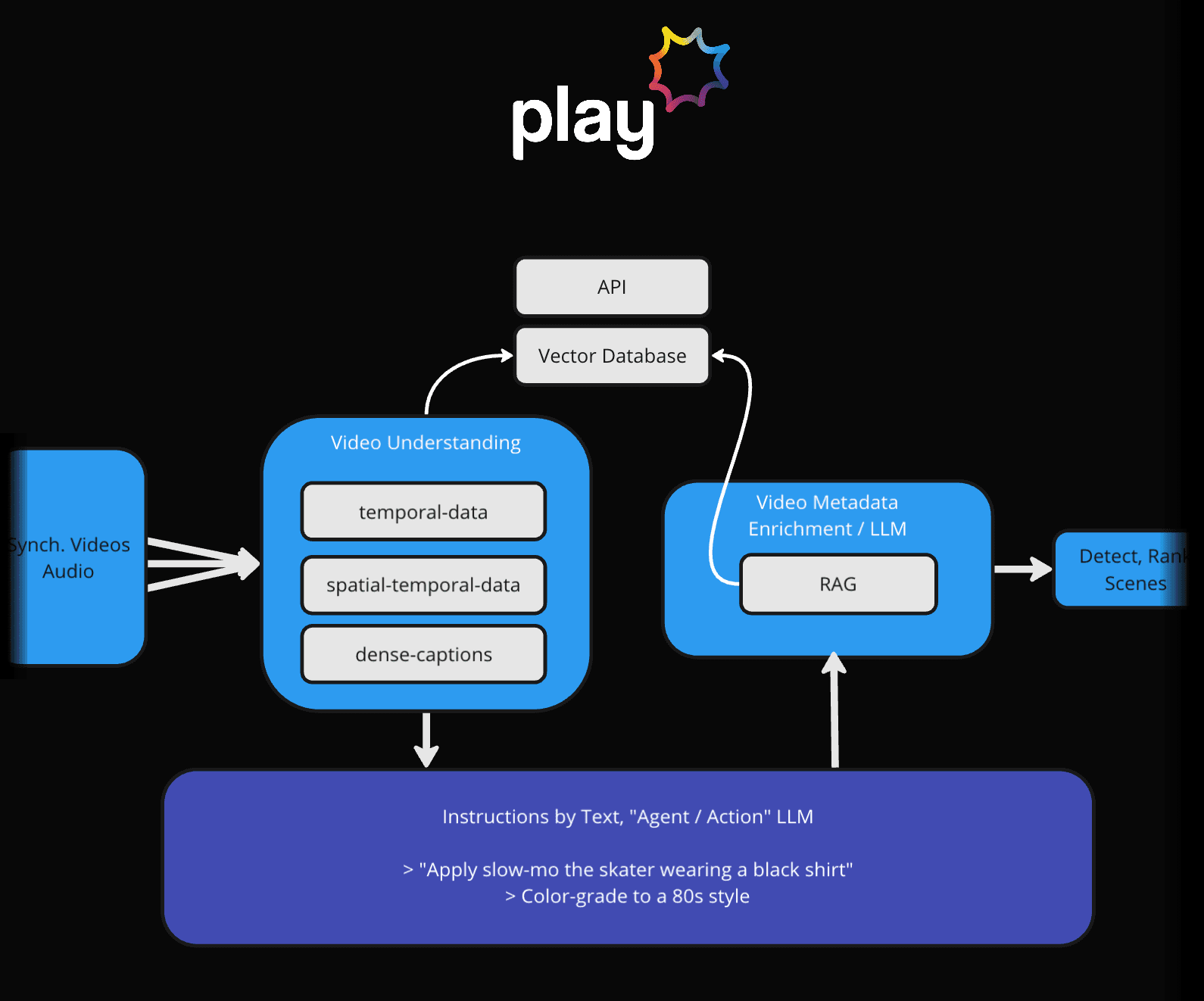
- Vector Database: Utilizes advanced vector-based indexing to store and retrieve video metadata efficiently.
- Re-Identification Algorithms: Uses deep learning models to detect and match subjects across different video clips.
- Metadata Tags: Keywords and tags are generated using Natural Language Processing (NLP) and computer vision techniques to describe subjects and their actions accurately.
Further Reading
More detailed metadata information, refer to the chapter about Metadata / Video Content Description